
Last tested: October 2026 · 14 hosts · Method: Chrome + JDownloader 2 with paid accounts
Most “best file hosting” articles rank cloud backup services — Google Drive, Dropbox, pCloud. This guide does something different, and it’s important you know the distinction before reading further.
This is a guide to premium one-click file hosts — commercial services like Rapidgator, Keep2Share, Nitroflare, and TezFiles that you pay for not to store your own files, but to retrieve a specific file someone else has already uploaded. You find a download link on a forum or link aggregator, see it’s hosted on one of these platforms, and the free tier is too slow or too gated to use — so you buy temporary premium access to that one host.
If you’re looking for somewhere to back up your own photos or sync documents across devices, this is the wrong page — go look at Google Drive, pCloud, or Backblaze instead. If you’re trying to download a file that’s sitting on one of these commercial hosts, you’re in exactly the right place.
Every number in this guide came from our own downloads: a real paid account, a real multi-part archive, measured independently in both a browser (Chrome, single connection) and JDownloader 2 (multi-threaded, parallel connections) on a 1 Gbps symmetric fiber line. We report both numbers for every host because they often tell completely different stories about the same service.
Backing up your own files? Wrong guide — you want Google Drive, pCloud, or Backblaze.
Downloading from a specific file host link? You’re in the right place.
Quick Verdict: Best Host for Every Situation
| Your Situation | Buy This | Why |
|---|---|---|
| Safest all-rounder | Rapidgator | Widest file availability + 54.28 MB/s in JD2 |
| Raw speed champion | Alfafile | Fastest host we measured (~60 MiB/s in JD2) |
| Exclusive forum/K2S content | Keep2Share Premium Pro | 50 GB/day quota with full JD2 support — avoid Basic entirely |
| Best budget multitasker | Uploady ($12.74 with TG15) or DailyUploads ($12.99) | Strong JD2 throughput (40.015 MiB/s / 34.0 MB/s) at entry-level pricing |
| Browser-only, no download manager | Upstore or Nitroflare | Both hold up reasonably well without JDownloader 2 |
| Lowest monthly cost overall | See Cheapest Premium File Hosts | Price-per-GB beats headline speed for budget buyers |
One-line answer: if you’re buying a single account and don’t want to overthink it, buy Rapidgator and run it through JDownloader 2. Table of Contents
2026 Premium Speed Test Rankings at a Glance
Every figure below is from a paid account on a 1 Gbps symmetric fiber connection, tested in both Chrome (single-stream) and JDownloader 2 (multi-connection). Ranked by JD2 combined throughput, since that’s the number that reflects what the service can actually do when configured properly.
| Host | JD2 Combined Speed | Chrome Browser Speed | Free Tier Speed | JD2 Status | Review |
|---|---|---|---|---|---|
| Alfafile | ~60 MiB/s | 11.7 MB/s | ~50 KB/s | Works cleanly | Review → |
| Rapidgator | 54.28 MB/s (8 parts) | Well below JD2 | Restricted | Works | Review → |
| TezFiles | 53.15 MB/s | 3.8 MB/s | 51.2 KB/s | Works | Review → |
| Upstore | 47.90 MB/s (4 parts) | 8.3–8.7 MB/s | Clean but slow | Works | Review → |
| Nitroflare | 41.84 MB/s (51.23 peak) | 14.0 MB/s | 18.0 KB/s | Works | Review → |
| Clicknupload | 41.212 MB/s | 10–13 MB/s | 30.0 KB/s | Works after retest | Review → |
| Uploady | 40.015 MiB/s | 17.4 MB/s | 474 KB/s | Works | Review → |
| Uploadgig | 37.8 MB/s | 14.4 MB/s | 30.0 KB/s | Works | Review → |
| FileJoker | 37.77 MiB/s | 11.8 MB/s (32.7 MB/s parallel) | 127 KB/s | Works | Review → |
| Keep2Share (Pro) | 34.67 MB/s (3 parts) | 5 MB/s | ~22.4 KB/s | Works (Pro only) | Review → |
| DailyUploads | 34.0 MB/s | 12.6 MB/s | 3.0 MB/s | Works | Review → |
| DDownload | 32.64 MB/s | 13.9 MB/s | 28.5 KB/s | Works | Review → |
| Katfile | Unstable | 10.6 MB/s | 100 KB/s | Inconsistent | Review → |
| FileQ | No JD2 support | 27.6 MB/s | Restricted | Not supported | Review → |
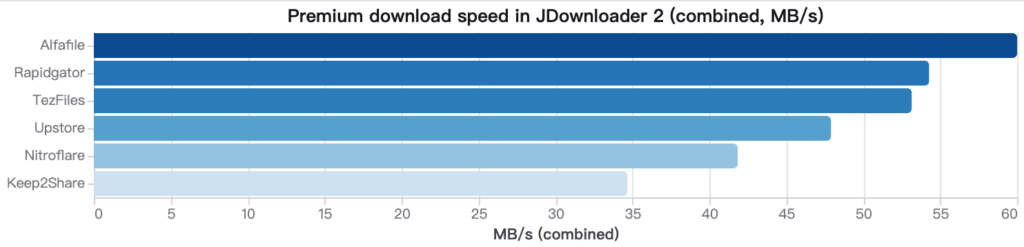
JD2 = JDownloader 2 combined throughput across simultaneous multi-connection downloads. Chrome browser speed reflects a single-stream download with no download manager. That gap — often 3x to nearly 15x on the same host, same account, same file — is the single most misunderstood fact about premium file hosts. TezFiles is the extreme case: 3.8 MB/s in Chrome versus 53.15 MB/s in JD2, a roughly 14x difference. If you only ever download through a browser, you are leaving the majority of what you paid for on the table.
The Best Premium File Hosts Reviewed & Ranked
Rapidgator — Best Overall for File Availability & Speed
JD2: 54.28 MB/s (8-part archive) · Widest file availability of any host tested
Rapidgator wins on the metric that actually decides whether a premium account was money well spent: the file you’re looking for is probably on it. Coverage across link sites and forums is broader than any other host in this guide, and speed backs it up — our 8-part archive test in JDownloader 2 pulled a combined 54.28 MB/s, dramatically ahead of what a single browser stream managed on the same account and session.
Pros: best file availability tested; excellent JD2 throughput; long-established, stable service.
Cons: browser-only downloading wastes most of what you paid for; free tier is heavily restricted.
Buy if: you download from many different sources and want one account that works most of the time.
Skip if: you refuse to install a download manager — you’ll never see the speed that justifies the price.
→ Full Rapidgator review · Rapidgator alternatives
Alfafile — Highest Raw Download Speed
JD2: ~60 MiB/s — the single fastest result in our entire test set
If your target file happens to be on Alfafile, nothing else in this guide moves it faster. JDownloader 2 authenticated the account cleanly with no retries, and throughput topped every other host we measured.
Pros: highest raw throughput measured; clean JD2 authentication.
Cons: narrower file availability than Rapidgator — a poor choice as your only account.
Buy if: you have a confirmed Alfafile source and speed is the priority.
Skip if: you’re buying blind, hoping it covers whatever you find later.
TezFiles — Biggest Speed Gain in JDownloader 2 (14.7x Jump)
JD2: 53.15 MB/s · Chrome: 3.8 MB/s
TezFiles produced the single widest browser-vs-JD2 gap in our entire test. A single Chrome download crawled at just 3.8 MB/s — barely usable on a 1 Gbps line — while the exact same account in JDownloader 2 reached 53.15 MB/s across multiple parallel connections. That’s a roughly 14.7x speed multiplier depending entirely on which client you use.
This makes TezFiles a conditional recommendation: the host is only as good as your download client. Buy it expecting to use JD2, and it’s one of the fastest services tested. Buy it planning to use a browser, and the $35.94 starting price becomes very hard to justify.
Buy if: you already run JDownloader 2 as your default download tool.
Skip if: you download exclusively through the browser — you’ll never see the speed you paid for.
Upstore — Most Consistent Browser and JD2 Performance
JD2: 47.90 MB/s (4 parts) · Chrome: 8.3–8.7 MB/s
Upstore is the most predictable host in this entire guide. Premium browser downloads held a steady 8.3–8.7 MB/s in Chrome — no erratic drops — and JD2 reached 47.90 MB/s across four active downloads. The free tier is slow but clean, with no aggressive interstitials or deliberately confusing wait-time games.
Pros: solid performance in both browser and JD2; usable free tier for testing a link before you pay; consistent, low-drama behavior.
Cons: not the fastest at peak; file availability below Rapidgator.
Buy if: you download in occasional bursts and want something that just works without surprises.
Nitroflare — Fast Premium Transfers with Non-Recurring Billing
JD2: 41.84 MB/s average (51.23 MiB/s peak) · Chrome: 14.0 MB/s
Nitroflare has one of the sharpest free-to-premium contrasts we measured. Premium browser downloads are genuinely quick at 14.0 MB/s, and JD2 reached 41.84 MB/s average with peaks up to 51.23 MiB/s. The free tier, by contrast, crawled at just 18.0 KB/s in our test — slow enough that a large archive becomes an overnight job. That’s not necessarily a strike against the service; it means the free tier tells you nothing useful about what Premium delivers, so don’t judge Nitroflare by a free test alone.
One genuine buyer benefit: every Nitroflare plan is billed as Non-Recurring, meaning no surprise auto-renewal to track down and cancel.
Pros: strong browser performance, unusual at this speed tier; reliable JD2 authentication; non-recurring billing on every plan.
Cons: free tier is extremely slow, effectively a paywall; entry-level Trial plan is a poor value compared to the next tier up.
Buy if: you want good speed without depending entirely on a download manager.
Skip if: you were hoping to get by on the free tier.
Keep2Share — Crucial for Exclusive Archives (Buy Pro, Skip Basic)
JD2: 34.67 MB/s (3 parts, Pro tier) · Free: ~22.4 KB/s
Keep2Share is a targeted purchase, not a general-purpose one. It’s worth buying when your files are specifically on K2S and you use JDownloader 2 — in that scenario, the Pro tier performs respectably at 34.67 MB/s combined.
Two warnings. First, the free tier measured around 22.4 KB/s in our test — functionally broken for anything above a few megabytes, with a brutal 56-minute cooldown between files on top of that. Second, and far more important: the Basic Premium tier does not support JDownloader 2 accelerators or parallel downloads at all, and caps you at just 10 GB/day with a “New users only” eligibility restriction. If you’re buying K2S at all, buy Premium Pro (50 GB/day, full JD2 support). The Basic tier looks cheap on the pricing page and then simply doesn’t work the way you need it to.
Pros: solid JD2 performance on Pro; consistent availability across the K2S/FileBoom/TezFiles family of hosts.
Cons: free tier is unusable; Basic Premium lacks JD2 accelerator support entirely — a real trap for unwary buyers.
Buy if: your target files are on K2S. Choose Premium Pro, not Basic.
Skip if: you want a single all-purpose account — buy Rapidgator instead.
→ Full Keep2Share review · Keep2Share alternatives
Uploady — Strong Speeds and 15% Off with TG15
JD2: 40.015 MiB/s (4 files) · Chrome: 17.4 MB/s single file
Uploady punches above its price point. A single Chrome download reached 17.4 MB/s — one of the stronger single-stream browser results in this guide — and four files in JDownloader 2 combined for 40.015 MiB/s. The free tier ran at 474 KB/s in our test, well above several competitors’ free-tier speeds, though still gated behind a 120-second wait timer and CAPTCHA.
Coupon code TG15 takes 15% off Standard Premium when paying by card or crypto (it doesn’t apply to reseller routes), bringing the 30-day plan down to $12.74 — one of the cheapest effective entry points among hosts with genuine JD2 multi-threading support. One caveat: JDownloader 2 displays this account’s traffic as “Unlimited,” which conflicts with the official plan page’s hard daily caps of 50–150 GB/day. Budget against the published allowance, not the client label.
Pros: strong Chrome and JD2 speeds for the price; TG15 coupon genuinely lowers cost; usable free tier for link verification.
Cons: JD2’s “Unlimited” traffic display is misleading; TG15 excluded from reseller/PayPal routes.
Buy if: you want solid multi-file throughput at a budget price and plan to pay by card.
DailyUploads & Clicknupload — Top Budget Performers
DailyUploads JD2: 34.0 MB/s · Clicknupload JD2: 41.212 MB/s
These two are the budget workhorses of the group. DailyUploads delivered 12.6 MB/s in Chrome and 34.0 MB/s combined across four files in JDownloader 2, all starting at $12.99 for 30 days — though the 90-day card checkout in our test billed $44.99 against an advertised $29.99, a $15 markup worth catching before you commit to anything beyond the 30-day plan.
Clicknupload delivered a reasonable 10–13 MB/s on premium browser downloads and 41.212 MB/s combined in JD2 — genuinely competitive with hosts costing significantly more. The one quirk worth flagging: JDownloader 2 did not verify the premium account on the first attempt in our test and only authenticated after a retest. That’s not a broken account; it’s a setup hiccup that gets misread as a refund-worthy problem when it just needs a second pass.
Pros: both offer strong JD2 throughput well below the price of top-tier hosts.
Cons: DailyUploads’ 90-day checkout can bill more than advertised; Clicknupload’s JD2 login may need a retry.
Buy if: your links are on either host and you’re comfortable double-checking the final checkout total or retrying a JD2 login once.
→ Full DailyUploads review · Full Clicknupload review
FileQ & Katfile — Browser-Dependent Hosts
FileQ Chrome: 27.6 MB/s, no JD2 support · Katfile: unstable JD2 performance
These two hosts sit in a different category from everything else on this list: neither offers reliable JDownloader 2 support, so your actual experience is capped at whatever a browser alone delivers.
FileQ actually performs well in Chrome — 27.6 MB/s on a single-stream browser download is a genuinely strong number, competitive with several hosts’ combined JD2 figures. But there’s no JD2 integration at all, so that 27.6 MB/s is the ceiling, not a starting point you can multiply with parallel connections.
Katfile’s Chrome performance (10.6 MB/s) is more modest, and our testing found its JDownloader 2 behavior inconsistent — sometimes authenticating and transferring normally, other times failing to maintain a stable multi-connection session. Treat it as a browser-only host until that stabilizes.
Pros: FileQ’s browser speed is unusually strong for a single stream.
Cons: neither host offers dependable JD2 multi-threading, capping total throughput well below top-tier competitors.
Buy if: you specifically need a file only on one of these hosts and are fine downloading through a browser.
Skip if: you want JD2 batch-queue downloading — look elsewhere first.
4-Step Decision Framework: How to Pick Without Wasting Money
Step 1 — Find your file first, buy second. This is the golden rule, and it’s the single most expensive mistake buyers make: purchasing an account and only afterward discovering the file they wanted is hosted somewhere else entirely. Locate the actual download link, identify which host it’s on, confirm you can see the file page, and only then buy premium access to that specific service.
Step 2 — Install JDownloader 2 before you judge any host’s speed. On TezFiles, the gap between browser and JD2 was nearly 15x. On Rapidgator, Alfafile, and most of the hosts in this guide, JD2 delivered multiple times the throughput of a single Chrome stream. If you only ever download through a browser, you are paying premium prices for a fraction of what the account can actually do. This single step matters more than which host you choose.
Step 3 — Evaluate the daily quota, not just the headline speed. A host advertising 50 MB/s combined throughput with a 30 GB daily cap gives you roughly ten minutes of full-speed downloading before you’re locked out for the day. TezFiles at 53.15 MB/s with a 100 GB/day allowance could theoretically exhaust its entire quota in about 30 minutes of continuous transfer. Divide your expected monthly download volume by each plan’s daily cap before comparing prices — the fastest host on paper can be the least practical one in daily use.
Step 4 — Always start with the shortest plan, typically 30 days. Hosts change pricing, daily limits, and JD2 compatibility without warning. FileJoker’s promo codes, DailyUploads’ checkout totals, and TezFiles’ payment gateways have all shifted between our testing rounds. Commit to a 90-day, 180-day, or annual plan only after a 30-day trial has gone the way you expected on your own connection and with your own routing.
Critical Traps to Avoid When Buying File Hosts
- The Basic tier trap: Keep2Share’s Basic Premium plan looks like the cheapest entry point on the pricing page, but it excludes JDownloader 2 accelerator support and parallel downloads entirely, on top of a restrictive “New users only” eligibility badge and a 10 GB/day cap. Always confirm a lower-tier plan supports the features you actually need before assuming cheaper is better.
- Hidden PayPal surcharges: FileJoker’s PayPal checkout route added a 40% fee (€18.05 EUR on a €44.95 EUR plan) plus a $0.10 verification charge. Nitroflare’s PayPal route added a €10.38 fee on a €34.62 base — also roughly 30–40% extra. Pay by card or cryptocurrency wherever possible to avoid these surcharges entirely.
- Card checkout markups beyond the advertised price: DailyUploads’ 90-day plan is advertised at $29.99, but our card checkout billed $44.99 — a $15 jump with no clear explanation for the inflated item price. Always verify the actual total on the final payment screen before confirming, regardless of what the plan card advertised.
- Debrid and multihoster reliability limits: If you’re relying on a multihoster or debrid service rather than buying premium access directly, verify its current support for your specific host and the applicable daily quota before assuming every link will work. Support for individual hosts on these intermediate services changes frequently and without notice — a host appearing on a “supported” list doesn’t guarantee today’s specific link will resolve.
- Quota display discrepancies between website and JD2: Several hosts show different numbers on their website’s plan page versus what JDownloader 2 reports as remaining traffic (Uploady’s “Unlimited” label versus its real 50–150 GB/day cap is the clearest example). Always budget against the officially published daily allowance, not whatever the download client happens to display.
Frequently Asked Questions
Which file host is fastest in 2026?
Alfafile, at roughly 60 MiB/s combined in JDownloader 2. Rapidgator (54.28 MB/s) and TezFiles (53.15 MB/s) follow closely behind. See our dedicated Fastest File Hosts Tested guide for the full breakdown.
Do I actually need JDownloader 2?
Not strictly, but it changes the outcome dramatically on most hosts. TezFiles showed a roughly 14.7x speed difference between a single Chrome download and a JD2 multi-connection session on the identical account. If you download regularly from these services, installing JD2 is close to mandatory for getting your money’s worth. See JDownloader Compatible File Hosts.
Why are free tiers on these hosts so slow?
Free tiers exist to let you confirm a link is alive, not to serve as a real download option — they’re deliberately throttled to push users toward paid plans. Speeds ranged from roughly 18.0 KB/s (Nitroflare) and 22.4 KB/s (Keep2Share) up to 3.0 MB/s (DailyUploads) and 125–130 KB/s (FileJoker) in our testing. Use the free tier to verify a file exists before paying, not to attempt an actual download of anything beyond a few megabytes.
Should I use a debrid or multihoster service instead of buying direct premium access?
Multihoster and debrid services can be convenient if you need occasional access across many different hosts, but their support for any specific host and its current daily quota can change without notice. If you know in advance which single host carries the files you need regularly, buying direct premium access — as covered throughout this guide — typically gives you more predictable speed and a confirmed daily allowance than routing through an intermediate service.
Which host should I buy if I only want one account?
Rapidgator. File availability beats peak speed when you don’t know in advance where your future downloads will be hosted, and its JD2 performance (54.28 MB/s) is still near the top of the field.
Are these affiliate links?
Some are. This does not affect the test results or the ranking — every speed figure in this guide comes from our own independently measured downloads. See our Affiliate Disclosure and Editorial Policy for details.
Final Recommendations & Related Guides
The core principle running through every section of this guide is simple: find your file first, buy second. No host on this list is universally “the best” — the right choice depends entirely on where your specific file is hosted, whether you’re willing to run JDownloader 2, and how much daily traffic you actually need.
- Buying one account, unsure what you’ll need: → Rapidgator
- Chasing maximum speed on a known source: → Alfafile
- Your files are on K2S: → Keep2Share Premium Pro (never Basic)
- Strong speed on a tight budget: → Uploady with code TG15, or DailyUploads
- You won’t use a download manager: → Upstore or Nitroflare
- Cost is the deciding factor: → Cheapest Premium File Hosts
Before paying for any plan, verify the current price, daily traffic allowance, and payment options directly on the host’s own checkout page — these details change more frequently than any review site, including this one, can track in real time.
Related guides: Fastest File Hosts Tested · JDownloader Compatible File Hosts · Cheapest Premium File Hosts · All Guides